
Custom Google Search Integration in Moodle: Step-by-Step Guide
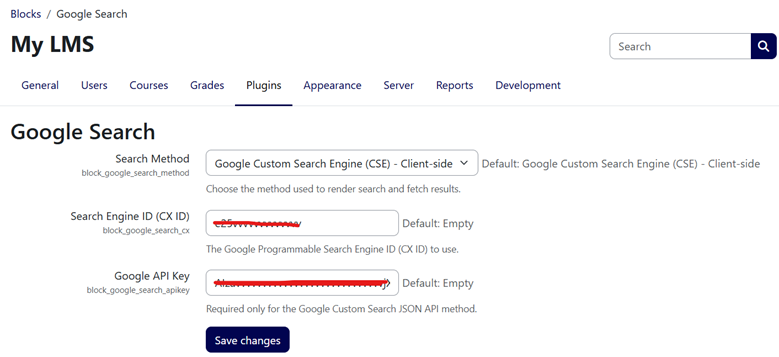
Build a Custom Google Search Block for Moodle: Implementation and Troubleshooting Guide
Search is the gateway to knowledge. In virtual learning environments like Moodle, students often need to look up concepts, definitions, and external resources. Bringing a search interface directly into the Moodle dashboard can improve productivity and keep students engaged.
This guide explains how to build a lightweight Google Search block for Moodle LMS, how it can integrate with Google Programmable Search Engine (CSE), and how to troubleshoot common configuration and loading problems.
The Architectural Challenge: Client-Side vs. Server-Side Search
When building a Google search feature for a website, developers generally consider two approaches:
- Server-side scraping: Sending HTTP requests to Google from the backend and parsing the returned HTML.
- Official Google Programmable Search Engine: Injecting Google’s client-side JavaScript component into the page.
Although server-side scraping offers extensive UI customization, automated queries can be blocked by anti-bot protections. This makes scraping fragile and difficult to maintain.
A more reliable Moodle implementation can support both of these options:
- Google CSE: A client-side integration that uses the visitor’s browser and is the recommended default for most sites.
- Google Custom Search JSON API: A server-side API integration that retrieves JSON results using an API key and renders them in a custom layout.
Step 1: Build the Moodle Block Structure
Moodle plugins follow a specific directory structure. A custom block named google_search can be organized like this:
blocks/google_search/
├── db/
│   └── access.php
├── lang/
│   └── en/
│       └── block_google_search.php
├── amd/
│   ├── src/
│   │   └── search.js
│   └── build/
│       └── search.min.js
├── block_google_search.php
├── edit_form.php
├── settings.php
├── search_ajax.php
├── styles.css
└── version.php
The main files have these purposes:
block_google_search.phpcontrols the block and its output.edit_form.phpmanages block-instance settings.settings.phpstores global site-wide settings.search_ajax.phphandles an optional server-side JSON API request.styles.csscontains the block’s custom styling.version.phpdefines the Moodle plugin version metadata.
The Block Controller
The block controller extends block_base, retrieves the configured Search Engine ID, and renders the Google CSE interface.
class block_google_search extends block_base {
    public function init() {
        $this->title = get_string('pluginname', 'block_google_search');
    }

    public function get_content() {
        global $CFG;

        if ($this->content !== null) {
            return $this->content;
        }

        $this->content = new stdClass();
        $cx = !empty($this->config->cx) ? $this->config->cx : $CFG->block_google_search_cx;

        $this->content->text =
            '<div class="google-search-cse-container">' .
            '<div class="gcse-search" data-linktarget="_blank" data-defaultToImageSearch="false"></div>' .
            '</div>';

        return $this->content;
    }
}
Load the Google CSE script according to Moodle’s JavaScript and page-rendering conventions rather than inserting duplicate scripts on every block instance. This helps prevent conflicts when multiple blocks appear on the same page.
Step 2: Configure Google Programmable Search
The block requires a Search Engine ID, also called a CX ID, to display results. Create or select a Programmable Search Engine, configure the websites or domains it should search, and copy the generated CX ID into the Moodle block settings.
Why does the search return no results?
A message such as “Your search did not match any results” usually means that the search engine has no indexed pages matching the query, the configured sites are too restrictive, the CX ID is incorrect, or the search engine has not finished processing its configuration.
- Confirm that the CX ID was copied correctly.
- Check that the target website or domain is included in the search engine configuration.
- Test a broad query before testing a very specific phrase.
- Verify that the target pages are publicly accessible and indexable.
- Allow time for newly added sites or configuration changes to take effect.
Client-Side CSE vs. JSON API
Client-side CSE
The client-side option is usually the simplest and most resilient approach. Google handles the search interface and browser-side requests, while Moodle is responsible only for displaying the block.
JSON API
The JSON API option can provide more control over the layout and result presentation, but it requires an API key, quota management, secure server-side requests, and careful handling of errors. Never expose API keys in browser-side JavaScript or public page markup.
Common Troubleshooting Steps
- Blank block: Confirm that the block is enabled, visible to the current user, and placed in a valid Moodle page region.
- Script does not load: Clear Moodle caches, check browser console errors, and verify that the integration is not blocked by a content-security policy or another optimization layer.
- No results: Recheck the CX ID, searchable domains, indexing status, and query wording.
- Duplicate search boxes: Make sure the Google script is loaded only once per page.
- Layout problems: Use scoped CSS selectors for the block and test it on desktop and mobile screen sizes.
- API errors: Check the API key, enabled services, quota, permissions, and server-side error logs without exposing credentials.
Recommended Implementation
For most Moodle sites, start with Google CSE because it is easier to maintain and keeps API credentials out of the browser. Add the JSON API only when the project requires a custom result layout or server-side control.
After installing or updating the block, purge Moodle caches, test it while logged in and logged out, and verify that it works across the main pages where students and staff will use it.
Conclusion
A custom Google Search block can make external research more convenient for Moodle users. A clean plugin structure, a correctly configured Search Engine ID, secure API handling, and systematic troubleshooting will provide a more reliable integration than server-side scraping alone.